Resource management
This tutorial discusses what kind of resources are defined in the Avassa platform and how to limit the amount of resources available to a subtenant, or to a specific application or service instance.
Resource overview
The following types of resources are considered by the Avassa platform:
- CPU
- memory
- disk space for container storage layer
- network bandwidth
- container volumes
- hardware devices (e.g. cameras, sensors etc.)
- GPU
- ingress IP address
availability when
ingress-ipv4-allocation-method: pool - network access
A tenant may request an amount or set of resources to be allocated to a single application or service instance in the corresponding application specification.
In addition to this, a site provider may control the amount or set of resources available to each of its subtenants, or limit the resources available on certain sites/hosts in the system. This is done using the resource profile mechanism discussed below.
The amount of available resources on each host is an important input taken into account when taking scheduling decisions within a site, i.e. deciding which host each service instance should be scheduled to, or whether it can be scheduled.
Generally there are several pieces of configuration related to each type of resource:
- resource definition created by the site provider
- except CPU, memory, disk space which are determined automatically
- irrelevant for network bandwidth and network access
- resource limits set in the resource profiles
- system resource profiles set limits globally, per site or per host
- tenant resource profiles set limits per tenant or per assigned site
- resources are requested in the application specification
- CPU, memory, disk space, network bandwidth and network access have default values
- other resources are not allocated unless explicitly requested
When resource changes take effect
Resources are allocated to a service instance and its containers when a scheduling decision is taken for the service instance. Changing a resource declaration, a resource limit in a resource profile, a system-wide resource default, or the reference to a resource profile therefore does not affect the service instances that are already running: the new values are applied when the service instance is rescheduled.
This holds for all of the resource types described below, with one exception: a change affecting the network access resource is applied immediately to all affected running service instances.
To find out whether a change is still pending for a running container, use the
inspect-allocated-resources action.
Please find a detailed description of each type of resource below.
CPU resource
This resource type defines the amount of CPU computational resources available to the applications. An example configuration for the CPU resource in a system or tenant resource profile is:
cpus:
  cpus-limit: 4.0
The cpus-limit defines the number of CPUs available on each host for the
applications. When configured in a tenant resource profile the limit applies to
applications run by the tenant that has this profile assigned to it.
When scheduling applications, cpus-limit is considered, but not enforced.
This means that the CPU resource can be oversubscribed.
A desired number of CPUs may be requested in an application specification:
services:
  - ...
    containers:
      - ...
        cpus: 0.5
The amount of CPU resources allocated to a container matches the amount requested in an application specification and is enforced, namely in this example an application will not be able to consume more CPU cycles than the amount corresponding to 0.5 CPU on the host it is running on, even if there are free CPU cycles available.
Memory resource
This resource type limits the amount of memory available to the applications. An example configuration for the memory resource in a system or tenant resource profile is:
memory:
  memory-limit: 4 GiB
The memory-limit defines the maximum amount of memory available on each host
for applications. When configured in a tenant resource profile the limit applies to
applications run by the tenant that has this profile assigned to it.
When scheduling applications, the memory-limit is considered, but not
enforced. This means that the memory can be oversubscribed.
A desired amount of memory may be requested in an application specification:
services:
  - ...
    containers:
      - ...
        memory: 2 GiB
The amount of memory allocated to a container matches the amount requested in an application specification and is enforced, namely in this example an application will not be able to allocate more than 2 GiB of memory (including the kernel memory and buffers/cache), even if there is free memory available on the host.
Disk space for container storage layer resource
This resource type limits the amount of storage space available for writable container layer storage. Note that this does not include the read-only (image) container layers nor the data stored in the ephemeral or persistent volumes. An example configuration for the container storage disk space resource in system or tenant resource profile is:
container-storage:
  container-layer-storage-limit: 500 MiB
The container-layer-storage-limit defines the maximum amount of disk space
for storing the container writable layer available on each host for
applications. When configured in a tenant resource profile the limit applies to
applications run by the tenant that has this profile assigned to it.
A desired amount of container storage disk space may be requested in an application specification, for example to request a read-only container root filesystem:
services:
  - ...
    containers:
      - ...
        container-layer-size: 0 B
The amount of disk space allocated for a container layer size matches the amount requested in an application specification and is only enforced when the underlying filesystem supports disk quota.
Setting container-layer-size to 0 B is a special case in which the
container's root filesystem is mounted read-only, which can be enforced
regardless of the underlying filesystem. Consequently, setting the
container-layer-storage-limit to 0 B in a tenant resource profile enforces
a read-only container filesystem for all applications deployed by the tenant
the profile is assigned to.
Network bandwidth resource
This resource type limits the amount of network bandwidth available to the applications. Currently it is not possible to limit this resource by means of a resource profile.
A desired network bandwidth may be requested in an application specification:
resources:
  network:
    upstream-bandwidth-per-host: 100Mbit/s
    downstream-bandwidth-per-host: 1Gbit/s
The amount of network bandwidth is neither guaranteed, nor strictly enforced. Naturally, the container is not able to get more bandwidth than the bandwidth of the external network channel connected to the host it is running on. Also, the application may get more bandwidth than requested if there is free bandwidth available (the network is not saturated). These parameters only matter when the network channel is saturated, in which case the network resources will be distributed between different applications running on the host proportionally to their requested bandwidth, by means of Linux queueing disciplines.
Container volumes resource
This resource type defines the disk space allocated for the applications to store the data persistently, with a lifecycle independent of each individual container's lifecycle. Currently it is not possible to limit this resource by means of a resource profile.
A container volume (ephemeral or persistent) may be requested in an application specification:
services:
  - ...
    volumes:
      - name: cache
        ephemeral-volume:
          size: 10GB
          file-mode: "770"
          file-ownership: 1000:1000
          match-volume-labels: movie-theater-owner.com/speed = fast
      - name: storage
        persistent-volume:
          size: 100GB
          file-mode: "770"
          file-ownership: 1000:1000
          match-volume-labels: movie-theater-owner.com/speed = slow
It is guaranteed that a volume will be allocated if requested in the application specification. The underlying storage is not overallocated, so the volume can only be allocated if all the container volumes can fit into a host volume they are allocated on. However, the disk space limit is only enforced if the underlying filesystem supports disk quota. If all the volumes requested by a service cannot be allocated, then the service is not scheduled.
A [host volume][host-volume] is a storage space designated by the site provider for allocating to container volumes. See a configuration example in storage configuration how-to.
System volumes resource
This resource type defines the filesystem paths in the host's default mount namespace that should be available for applications to bind-mount into containers' mount namespaces. An example configuration for the system volumes in a tenant resource profile is:
system-volumes:
  - name: my-daemon-socket
  - name: systemd-socket
The name in this configuration is a reference to the system-volume defined
in either system settings or system resource
profile. An example system volume declaration:
system-volumes:
  - name: my-daemon-socket
    path: /var/run/my-daemon.sock
The system resource profile declares this resource. Without a declaration in either referred system resource profile, or in the system settings, the resource is not available on a given site.
The tenant resource profile limits the use of the resource, allowing the site provider to limit access to the resource to only some application owner tenants.
The only system volume defined by default is systemd-socket. All other system
volumes must be declared either in the system settings, or at a system resource
profile level. The default, system-wide and profile definitions are combined so
that all of these system volumes are available on a site and host. It is
possible to override a system volume definition with the same name at each more
specific level: for example, a profile-level declaration overrides a
system-wide with the same name, while a system-wide overrides the default
declaration.
The access to the available system volumes is controlled with the help of tenant resource profiles. If no system volumes are specified at any tenant resource profile level (per tenant or per assigned site), then no system volumes may be used by this tenant. Site providers are an exception: they always have access to all available system volumes. For the application owners, only the system volumes specified in an applicable resource profile can be used.
If a tenant resource profile referred at the assigned site level (more specific) contains any system volume limitations, then these take precedence over the tenant resource profile referred at the tenant level (general).
A system volume may be requested in an application specification:
services:
  - ...
    volumes:
      - name: systemd-socket
        system-volume:
          reference: systemd-socket
If a service instance has requested a system volume it does not have access to, then the service instance is not scheduled.
Hardware devices resource
This resource type defines the devices that can be passed through to the applications. The devices are referenced using labels. An example configuration for hardware devices in a tenant resource profile is:
device-labels:
  - name: rtc
  - name: tty
The name in this configuration is a reference to the device-labels declared
in either system settings or system resource
profile. Please refer to the Device discovery
tutorial for more information on configuring hardware
devices.
The system resource profile declares this resource. Without a declaration in either referred system resource profile, or in the system settings, the resource is not available on a given site.
The tenant resource profile limits the use of the resource, allowing the site provider to limit access to the resource to only some application owner tenants.
There are no device labels declared by default. All device labels must be declared either in the system settings, or at a system resource profile level. The default, system-wide and profile definitions are combined so that all of these device labels are available on a site and host. It is possible to override a device label definition with the same name at each more specific level: for example, a profile-level declaration overrides a system-wide with the same name, while a system-wide overrides the default declaration.
The access to the available device labels is controlled with the help of tenant resource profiles. If no device labels are specified at any tenant resource profile level (per tenant or per assigned site), then no device labels may be used by this tenant. Site providers are an exception: they always have access to all available device labels. For the application owners, only the device labels specified in an applicable resource profile can be used.
If a tenant resource profile referred at the assigned site level (more specific) contains any device label limitations, then these take precedence over the tenant resource profile referred at the tenant level (general).
Note that all devices referenced by the device labels accessible by a tenant are available to it. It is not possible to disallow a single device out of several devices referenced by the same allowed device label.
A device may be requested in an application specification as follows:
services:
  - ...
    containers:
      - name: ...
        devices:
          device-labels:
            - rtc
Each device label requested by the container must match at least one device which will be mounted into the container. If there is at least one device label that does not have a matching device, then the service instance is not scheduled.
Dynamic device rules
This resource type is useful when the devices to be passed through to the applications are not readily available, but may be plugged in and unplugged (or otherwise deactivated) while the application is running. An example of a dynamic device rule is:
dynamic-devices:
  rules:
    - type: character
      major: 250
      minor: any
      permissions: read,write,mknod
The type is the type of the Linux device (block device or character device,
or a special value any that allows both types of devices), major is a major
device number (can be an integer to indicate a specific device number or a special
value any to allow all major numbers), minor is a minor device number and
permissions indicates the operations that are allowed to be performed: mknod
to create the special device file, read to read from this file and write to write
to this file.
By default an application owner has no access to dynamic devices. A site provider tenant may grant access to a set of dynamic devices for the application owner by configuring the rules in a tenant resource profile.
Dynamic device rules may be requested in an application specification as follows:
services:
  - ...
    containers:
      - name: ...
        devices:
          dynamic:
            rules:
              - type: character
                major: 250
                minor: any
                permissions: read,mknod
This request means that the application will be allowed to create a character device with major number 250 and any minor number and to read from this device, for example as follows:
$ mknod /dev/my-device c 250 0
$ cat /dev/my-device
If an application requests a dynamic device rule it does not have access to, then the service is not scheduled.
GPU resource
This resource type defines the graphical processing units (GPUs) that can be passed through to the applications. The GPUs are referenced using labels. An example configuration for GPUs in a tenant resource profile is:
gpu-labels:
  - name: nvidia
The name in this configuration is a reference to the gpu-labels declared
in either system settings or system resource
profile. Please refer to the GPU passthrough
tutorial for more information on configuring GPUs.
The system resource profile declares this resource. Without a declaration in either referred system resource profile, or in the system settings, the resource is not available on a given site.
The tenant resource profile limits the use of the resource, allowing the site provider to limit access to the resource to only some application owner tenants.
There are no GPU labels declared by default. All GPU labels must be declared either in the system settings, or at a system resource profile level. The default, system-wide and profile definitions are combined so that all of these GPU labels are available on a site and host. It is possible to override a GPU label definition with the same name at each more specific level: for example, a profile-level declaration overrides a system-wide with the same name, while a system-wide overrides the default declaration.
The access to the available GPU labels is controlled with the help of tenant resource profiles. If no GPU labels are specified at any tenant resource profile level (per tenant or per assigned site), then no GPU labels may be used by this tenant. Site providers are an exception: they always have access to all available GPU labels. For the application owners, only the GPU labels specified in an applicable resource profile can be used.
If a tenant resource profile referred at the assigned site level (more specific) contains any GPU label limitations, then these take precedence over the tenant resource profile referred at the tenant level (general).
Note that all GPUs referenced by the GPU labels accessible by a tenant are available to it. It is not possible to disallow a single GPU out of several GPUs referenced by the same allowed GPU label.
A GPU passthrough may be requested in an application specification as follows:
services:
  - ...
    containers:
      - name: ...
        gpu:
          labels:
            - nvidia
          number-gpus: 1
          gpu-patterns:
            - compute-mode == "Default"
Each GPU label requested by the container must match at least one GPU to be mounted into the container. If there is at least one GPU label that does not have a matching GPU, then the service instance is not scheduled.
See also API reference documentation for details.
Ingress IPs resource
This resource type defines the availability of ingress IP addresses that need to be allocated when an application requests an ingress IP address. This resource type can only be limited by a tenant resource profile, not by a system resource profile.
Only the IP addresses allocated by the Edge Enforcer can be limited, namely
on the sites configured with ingress-ipv4-allocation-method: pool. If any
other allocation method is in use, such as dhcp or port-forward, then the
limits imposed by resource profiles are ignored.
An example configuration for ingress IP ranges in a tenant resource profile is:
ingress-ipv4-ranges:
  allowed: scope = global
  default: scope = global
The value for both parameters is a label matching expression that selects IP ranges from the set of configured ingress ranges. For detailed information please refer to the how-to on configuring a pool of ingress IP addresses and the reference API documentation.
The individual parameters have the following meaning:
allowedselects the ingress IP ranges that are allowed to be requested by an application- site providers are an exception, they always have access to all ingress ranges
defaultselects the default IP ranges for allocation of ingress IP addresses when an application did not select an IP range explicitly
An ingress IP address may be requested in an application specification as follows:
services:
  - ...
    network:
      ingress-ip-per-instance:
        protocols:
          - name: tcp
            port-ranges: "9000"
        match-interface-labels: movie-theater-owner.com/external
        match-ipv4-range-labels: movie-theater-owner.com/private
A service instance requesting an ingress IP address must be allocated an IP
address on an interface matching the interface label expression from a range
matching the range label expression (however, the latter condition is ignored
on sites with allocation method other than pool). If an IP address cannot be
allocated within the requested constraints, then the service instance is
not scheduled.
See also API reference documentation for details.
Network access resource
This resource type limits the access to the network for applications. There are two types of network access that can be specified:
- outbound access refers to connections initiated by the application to locations outside of the application network
- inbound access refers to connections initiated by external endpoints or other applications to an application's ingress IP address
This resource type can only be limited by a tenant resource profile, not by a system resource profile. An example configuration for network access in a tenant resource profile is:
outbound-network-access:
  deny-all: true
inbound-network-access:
  rules:
    192.0.2.0/24: allow
This example prohibits all outgoing network connections from the applications
this resource profile applies to, and only allows incoming connections from the
192.0.2.0/24 network.
Network access may be requested in an application specification:
services:
  - ...
    network:
      outbound-access:
        allow-all: true
      ingress-ip-per-instance:
        ...
        inbound-access:
          rules:
            192.0.0.0/8: allow
If an application did not explicitly specify the requested network access, then by default all outbound connections are prohibited and all incoming connections are allowed. The resulting network access is the intersection of the network access granted by the tenant resource profiles and the network access requested by the application.
Resource profiles
Most of the above mentioned resources may be limited at the following levels: system-wide, on a per tenant, per site, per host or per tenant assigned site basis. The different hierarchies are explained below.
System resource profiles and system-wide resource defaults
The system resource profiles are defined by a site provider on a system level, which means that there is only one shared list of system resource profiles that any site provider may modify. System resource profiles may be applied at different levels by referencing the name of the profile definition:
In addition to the system resource profiles, the resource defaults may be defined system-wide at the system settings level.
Both system resource profiles and system-wide resource defaults allow the following resources to be declared:
In addition to these declarations, the following resources can be limited:
These declarations and limitations are applied at each site, unless overridden by a system resource profile applied at a site or host level.
When multiple resource profiles are applicable, e.g. both per site and per host profiles are defined, then the resulting resource restriction is the restriction set on the most specific level: e.g. if both per site and per host profiles define a restriction, then the per host restriction is applied.
In contrast to restrictions, the resource declarations in applicable resource profiles on different levels are combined. If a resource with the same name or label is defined on different levels however, then the definition on a more specific level applies.
An example of a simple system resource profile:
name: medium
memory:
  memory-limit: 8GiB
This example restricts the total memory available for scheduling applications
on each host where this system resource profile applies to 8 GiB.
Currently the memory, CPU and container-layer limits are not enforced, i.e. oversubscription is allowed for these resources. The physical amount of each resource and the limit defined in a resource profile are taken into account by the scheduler to better balance the application resource requirements within the site, but the application is not prevented from running when the limit is reached.
The full documentation for the system resource profile object together with the complete example is available in the reference documentation .
Tenant resource profiles
While system resource profiles allow restricting resources based on which host the application is scheduled to, tenant resource profiles add another dimension and allow to restrict resources based on the tenant that deploys the application. This means that we may allocate different amounts or sets of resources to different tenants on the same site.
Any tenant may apply tenant resource profiles to its children tenants. The
tenant resource profiles are defined by creating a top-level
tenant-resource-profiles object, e.g.
supctl create tenant-resource-profiles
The tenant can also see the tenant resource profiles defined by its subtenants in the tenants list, e.g.
supctl show tenants acme tenant-resource-profiles
Assigning a tenant resource profile to a subtenant is done by referencing the profile name:
- per tenant: in the tenant object
supctl merge tenants acme <<EOFtenant-resource-profile: appowner-profileEOF
- per tenant per site: in the assigned-site object
supctl merge tenants acme assigned-sites stockholm-sergel <<EOFtenant-resource-profile: appowner-sweden-profileEOF
A subtenant cannot see the tenant resource profile assigned to it by the parent tenant or refer to parent tenants' resource profile definitions.
Tenant resource profiles allow defining a limit and/or a default value for the following resources:
- CPU
- memory
- container writable layer disk space
- hardware devices (via labels)
- dynamic device rules
- GPU (via labels)
- system volumes
- ingress IP address ranges (applicable on sites
with
ingress-ipv4-allocation-method: pool) - network access (inbound and outbound)
Similarly to system resource profiles, if a tenant resource profile is assigned to a certain tenant both on the tenant level and the assigned site level, then the resulting resource restriction is the restriction defined on a most specific level: e.g. if both per tenant and per tenant per site restriction is defined, then the per tenant per site restriction is applied for this tenant on this site.
When both system resource profiles and tenant resource profiles are in force for a given container or service instance, then the tightest restriction of the two applies. For example, if a site-wide, a host-specific, a per tenant and a per tenant per site resource profiles are defined, then the resulting restriction is the tightest of the restrictions defined in the host-specific and per tenant per site profiles.
Note that the restrictions are hierarchical, i.e. if a tenant has a certain resource restricted to a certain amount on a given site, then its subtenants cannot be granted a greater amount of this resource on this site.
See also example in the section describing the behaviour when multiple resource profiles are combined.
System defaults
When no system or tenant resource profiles are in force for a given container or service instance, or the resource profiles that are in force do not contain any definitions for a certain type of the resource, the system default values apply. For the different resource types, they are:
- CPU resource:
- cpus limit is the number of CPUs on the host
- memory resource
- memory limit is the total memory on the host
- container layer resource
- container layer storage limit is the total size of the filesystem where the container engine stores the layer data
- hardware devices
- for the site provider tenant: access to any declared hardware device labels
- for the application owners: no access to hardware device labels by default
- dynamic device rules
- site provider tenant has access to any dynamic device rules
- application owners have no access to dynamic device rules by default
- GPU
- for the top tenant: access to any declared GPU labels
- for subtenants: no access to GPU labels by default
- system volumes
- for the site provider tenant: access to any declared system volume
- for the application owners: no access to system volumes by default
- ingress IPv4 ranges
- access to ingress IPv4 ranges:
- for the site provider tenant: all configured ingress IPv4 ranges
- for the application owners: only ingress IPv4 ranges with no labels assigned
- by default, the ingress addresses are allocated from the set of ranges with no labels assigned
- access to ingress IPv4 ranges:
- network access
- by default neither outbound nor inbound network access is restricted by a resource profile
- however, outbound network access is blocked unless specified in application specification
- by default neither outbound nor inbound network access is restricted by a resource profile
For hardware device labels, GPU labels, system volumes, dynamic device rules and ingress IPv4 ranges the site provider tenant has no restrictions on using these resources. However, for application owners the tenant resource profile effectively acts as an access list: the relevant hardware device labels, GPU labels, system volumes, dynamic device rules or ingress IPv4 ranges must be specified in either per tenant or per tenant per site resource profile assigned to the application owner in order for it to use these resources.
Resource profile combinations
Let us look at a few examples of how the restrictions on different resources are combined when multiple system and tenant resource profiles are in force.
Consider the following Avassa environment.
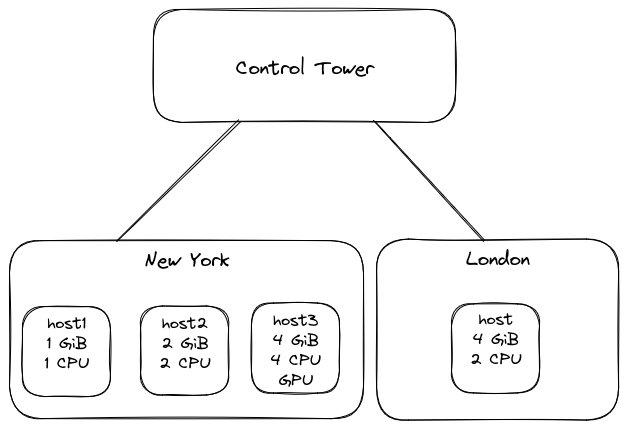
Suppose that there is a site-provider tenant provider and an
application-owner tenant acme. Both edge sites are assigned to acme.
The ingress configuration is as follows:
supctl show system sites --fields name,ingress-allocation-method,ingress-ipv4-address-ranges
- name: london
  ingress-allocation-method: dhcp
- name: new-york
  ingress-allocation-method: pool
  ingress-ipv4-address-ranges:
    - range: 192.0.2.200-192.0.2.254
      network-prefix-length: 24
    - range: 198.51.100.250-198.51.100.253
      network-prefix-length: 24
      labels:
        scope: global
The CPU, memory and container layer resources behave in the same manner.
If no hardware or tenant resource-profiles are in force, a container within
a service instance scheduled to host1 in site new-york is limited to 1 GiB
of memory and 1 CPU (both values are the physical amount of resource
available of the host). The same service instance scheduled to host in site
london is limited to 4 GiB memory and 2 CPUs. The container layer is also
limited by the filesystem capacity.
The access to hardware devices and GPUs is different for applications deployed
by provider and by acme:
- the applications deployed by
providerhave full access (meaning an application specification requesting access to any hardware device or GPU available on the site is granted it) acmehas no access to hardware devices or GPUs (so that a service instance for which access to any hardware device or GPU is requested in the application specification is not scheduled).
An application deployed by any of the tenants which requests an ingress address
with no match-ipv4-range-labels specified in the application specification
gets an ingress address from the 192.0.2.200-192.0.2.254 range on the
new-york site, and an ingress address from the external DHCP server on the
london site.
An application requesting an ingress address with match-ipv4-range-labels: scope = global:
- deployed by
provideron sitenew-yorkgets an ingress IP address from the198.51.100.250-198.51.100.253range - deployed by
acmeon sitenew-yorkis not scheduled because the subtenant does not have access to this range by default - deployed by any tenant on site
londongets an ingress IP address from the external DHCP server, because restricting theingress-ipv4-rangesresource does not have any effect on sites whereingress-allocation-methodis notpool
Now suppose the following resource profiles are configured (assuming supctl
is logged in as tenant provider in the terminal session below):
supctl show system resource-profiles
- name: medium
  memory:
    memory-limit: 2 GiB
supctl show tenant-resource-profiles
- name: t-acme
  cpus:
    cpus-limit: 2
    container-cpus-default: 1
  memory:
    memory-limit: 1 GiB
    container-memory-default: 512 MiB
  gpu-labels:
    - name: nvidia
  ingress-ipv4-ranges:
    allowed: "scope = global or {}"
  outbound-network-access:
    deny-all: true
  inbound-network-access:
    rules:
      192.0.2.0/24: allow
- name: t-acme-new-york
  cpus:
    cpus-limit: 1
  memory:
    container-memory-default: 1 GiB
  outbound-network-access:
    rules:
      192.0.2.0/24: allow
The resource profiles are assigned as follows (assuming supctl is logged in
as tenant provider):
supctl show system settings --fields resource-defaults
resource-defaults:
  memory:
    memory-limit: 3 GiB
supctl show system sites --fields name,resource-profile
- name: control-tower
- name: london
- name: new-york
  system-resource-profile: medium
supctl show tenants acme --fields name,tenant-resource-profile
name: acme
tenant-resource-profile: t-acme
supctl show tenants acme assigned-sites new-york --fields tenant-resource-profile
name: new-york
tenant-resource-profile: t-acme-new-york
With these resource profiles in place, consider the following scenarios:
- an application deployed by
provideron sitelondonis subject to restrictions imposed by system settings, but no tenant resource profiles:hostbehaves as if it had3 GiBof memory (not enforced)- no other resources are limited by the system settings, hence the same rules as in the case with no resource profiles configured apply
- an application deployed by
provideron sitenew-yorkis subject to restrictions imposed by both system settings andmediumsystem resource profile, but no tenant resource profiles:- host
host3behaves as if it had2 GiBof memory (as in the resource profilemedium, because this limit is lower than the memory limit in the system settings), while the behaviour forhost1andhost2is unchanged because the amount of physical memory on these hosts is smaller or same than the system resource profile limit. Note however that this is not enforced, so the behaviour only affects scheduling decisions and does not prevent oversubscription
- host
- an application deployed by
acmeon sitelondonis subject to restrictions imposed by both system settings andt-acmetenant resource profile:- the total amount of memory available to applications on
hostis1 GiBpert-acmetenant resource profile (because this limit is lower than the3 GiBlimit specified in the system settings) - the outbound network access is prohibited and the inbound network connections to the application's ingress address are only allowed from 192.0.2.0/24 network
- all other settings are not effective, because the number of cpus is the same as physical amount available while the configuration for GPU labels or ingress IPv4 address pools is not applicable
- the total amount of memory available to applications on
- an application deployed by
acmeon sitenew-yorkis subject to a combination of the restrictions imposed by the system settings, system resource profilemediumas well as tenant resource profilet-acmeand per tenant per site resource profilet-acme-new-york:- the total amount of memory available to applications deployed by
acmeonhost2andhost3is1 GiBpert-acmeprofile (not enforced). The amount of memory available onhost1is still1 GiBdue to physical limit. This has no effect on tenantprovider's applications, however if other tenants' applications are already running on sitenew-york, then the total amount of memory for all tenants' applications is still2 GiB(permediumsystem resource profile) - the total amount of cpus available to applications deployed by
acmeis1per host, pert-acme-new-yorkprofile (not enforced). This has no effect on tenantprovider's applications, however if other applications are already running on sitenew-york, then the physical number of cpus is still considered for all tenants' applications - the applications deployed on site
new-yorkhave access to GPU labelnvidia, according to thet-acmeprofile - an ingress address is still allocated from
192.0.2.200-192.0.2.254range by default, however it is now possible to request a global address by usingmatch-ipv4-range-labels: scope = globalexpression in the ingress specification in which case the address is allocated from the198.51.100.250-198.51.100.253range - the outbound network access is allowed only to 192.0.2.0/24 addresses, because
t-acme-new-yorkprofile takes precedence. The inbound network connections to the application's ingress address are only allowed from 192.0.2.0/24 network per thet-acmeprofile, because there are no specific restrictions in thet-acme-new-yorkprofile.
- the total amount of memory available to applications deployed by
Observe resource allocation
In order to inspect the resources allocated to a service instance and each container:
supctl show --site my-site applications my-app service-instances my-srv-1
name: my-srv-1
application-version: "1.0"
oper-status: running
...
gateway-network:
  ...
  outbound-network-access:
    inherited:
      default-action: deny
      rules:
        192.168.100.101/32: allow
    from-application:
      allow-all: true
    combined:
      default-action: deny
      rules:
        192.168.100.101/32: allow
ingress:
  ips:
    - 192.168.72.102
  inbound-network-access:
    inherited:
      allow-all: true
    from-application:
      allow-all: true
    combined:
      allow-all: true
containers:
  - name: my-container
    id: e370c0a7c563
    oper-status: running
    ...
    memory: 1 GiB
    cpus: 1.0
    container-layer-size: 20 GiB
    devices:
      - /dev/rtc0
    gpus:
      - id: GPU-ee1b2a5c-3cd0-0c4a-a240-d87c22748a35
Observe resource allocation from inside the application
Sometimes it can be useful for the application itself to know the amount of allocated resources to it. While in most cases it can be achieved by inspecting the relevant system parameters inside the container, in other cases it is only possible to expose the limitation to the container in the form of an environment variable. Here is a list of common approaches to observing the amount of available resources from inside the container:
- the amount of available memory is restricted by means of cgroups
- the restriction is exposed by the kernel via cgroupfs, commonly mounted under
/sys/fs/cgroup/sys/fs/cgroup/memory.maxfor cgroup v2/sys/fs/cgroup/memory.limit_in_bytesfor cgroup v1
- in some cases the cgroupfs may be unavailable inside the container, in such cases it is
possible to expose the amount of allocated memory to the container in an environment variable.
System variable
SYS_CONTAINER_MEMORYcan be used for this purpose, for example:services:...containers:...env:MEMORY: ${SYS_CONTAINER_MEMORY} - avoid using
freecommand or/proc/meminfofile for this purpose, because they show system-wide memory usage and do not take into account individual cgroups.
- the restriction is exposed by the kernel via cgroupfs, commonly mounted under
- the number of available vCPUs (
cpuresource) is restricted by means of cgroups- the restriction is exposed by the kernel via cgroupfs, commonly mounted under
/sys/fs/cgroup/sys/fs/cgroup/cpu.maxfor cgroup v2- the first number indicates the CPU time quota and the second number indicates
the period during which no more than the indicated quota of CPU time
can be used by the container. The amount of vCPUs can be calculated as
quota/period.
- the first number indicates the CPU time quota and the second number indicates
the period during which no more than the indicated quota of CPU time
can be used by the container. The amount of vCPUs can be calculated as
/sys/fs/cgroup/cpu.cfs_quota_usand/sys/fs/cgroup/cpu.cfs_period_usfor cgroup v1
- in some cases the cgroupfs may be unavailable inside the container, in such cases it is
possible to expose the number of allocated CPUs to the container in an environment variable.
System variable
SYS_CONTAINER_CPUScan be used for this purpose, for example:services:...containers:...env:CPUS: ${SYS_CONTAINER_CPUS} - avoid referring to
/proc/cpuinfofile for this purpose, because it shows physical CPUs available to the whole system and does not take into account individual cgroups.
- the restriction is exposed by the kernel via cgroupfs, commonly mounted under
- the container writable layer size is limited by filesystem quota
- the restrictions can be discovered by means of
statfscall on the root of the container filesystem, or the correspondingdfcommand- in case of read-only container root it can be discovered by inspecting
the
/proc/mountsfile or the correspondingmountcommand: the root filesystem is then mounted withroflag
- in case of read-only container root it can be discovered by inspecting
the
- if the underlying filesystem does not have quota support, then the container layer size is not limited
- the restrictions can be discovered by means of
- allocated ingress IP address is not directly visible inside the container,
but can be exposed to the container using the system variable
SYS_INGRESS_IPV4_ADDRESS, for example:services:...containers:...env:INGRESS_IP: ${SYS_INGRESS_IPV4_ADDRESS}
Debug resource allocation
Due to the multilayered (each tenant in the hierarchy imposing restrictions on its descendants) and multifaceted (system and tenant profiles) nature of resource profiles it can be hard to understand why a certain resource restriction has been applied to an application. To help answer this question one can employ one of the following actions, depending on the resource:
inspect-allocated-resourcesto debug container-level resources: CPU, memory, container layer size, devices (both mounted at start time and dynamic) and GPUgateway-network/outbound-network-access/debugandingress/inbound-network-access/debugactions to debug network rules on service instance level
Debug container-level resources
To inspect resource allocation, run the inspect-allocated-resources action on a container
and inspect its output. Note that the output differs depending on the tenant running the action.
First, let us inspect the output for the acme tenant, the same tenant that owns the application.
supctl do --site my-site applications my-application service-instances my-srv-1 \
    containers my-container inspect-allocated-resources
effective-constraints:
  memory:
    source: inherited
    constraint: 2 GiB
  cpus:
    source: inherited
    constraint: 4.0
  container-layer-size:
    source: inherited
    constraint: 20 GiB
  devices:
    source: inherited
    constraints:
      - label: rtc
        devices:
          - /dev/rtc0
  dynamic-devices:
    source: inherited
    constraints:
      - type: character
        major: 250
        minor: any
        permissions: read,write,mknod
  gpus:
    source: inherited
    constraints:
      - label: nvidia
        gpus:
          - id: GPU-e5b3b738-a420-4a49-a705-61c4c0f4f286
          - id: GPU-ee1b2a5c-3cd0-0c4a-a240-d87c22748a35
requested-resources:
  devices:
    device-labels:
      - rtc
    dynamic:
      rules:
        - type: character
          major: 250
          minor: any
          permissions: read,mknod
  gpu:
    labels:
      - nvidia
    number-gpus: 1
currently-allocated:
  memory: 1 GiB
  cpus: 1.0
  container-layer-size: 20 GiB
  devices:
    - /dev/rtc0
  dynamic-devices:
    - type: character
      major: 250
      minor: any
      permissions: read,mknod
  gpus:
    - id: GPU-ee1b2a5c-3cd0-0c4a-a240-d87c22748a35
would-allocate:
  memory: 1 GiB
  cpus: 2.0
  container-layer-size: 20 GiB
  devices:
    - /dev/rtc0
  dynamic-devices:
    - type: character
      major: 250
      minor: any
      permissions: read,mknod
  gpus:
    - id: GPU-ee1b2a5c-3cd0-0c4a-a240-d87c22748a35
There are several sections worth noting:
effective-constraintsindicates the total sum of all constraints set by different resource profiles on different levels. The actual allocated amount of resource may be lower if a lower amount is requested in the application specification or in a configured default.- note that for brevity only the available devices and GPUs for the labels requested in the application specification are shown
- for the application owner
acmeall of the constraint sources are indicated asinherited: it means that the restriction comes from a source that the tenant does not have the access to, for example parent's tenant resource profile
requested-resourcesindicates the amount of resources requested in the application specification for the currently running versioncurrently-allocatedindicates the amount of resources currently allocated to the running container- note that the value may not correspond to the
effective-constraintsin case some of the resource-profile definitions were changed since the service-instance was scheduled, see when resource changes take effect
- note that the value may not correspond to the
would-allocateindicates the amount of resources that would be allocated to the container according to the current resource-profile definitions. This section is only shown if different fromcurrently-allocated
This gives the tenant some information, but in certain cases this is not
sufficient and the actual constraint source must be found. In order to do this
the application owner must communicate with its parent tenant, the site
provider provider and ask them to run the same action.
supctl do --site my-site tenants acme applications my-application service-instances \
    my-srv-1 containers my-container inspect-allocated-resources
effective-constraints:
  memory:
    source: assigned-site-profile
    profile-owner: provider
    profile-name: t-my-site
    constraint: 2 GiB
  cpus:
    source: tenant-profile
    profile-owner: provider
    profile-name: t-acme
    constraint: 4.0
  container-layer-size:
    source: system-detected
    constraint: 20 GiB
  devices:
    source: assigned-site-profile
    profile-owner: provider
    profile-name: t-my-site
    constraints:
      - label: rtc
        devices:
          - /dev/rtc0
  dynamic-devices:
    source: tenant-profile
    profile-owner: provider
    profile-name: t-acme
    constraints:
      - type: character
        major: 250
        minor: any
        permissions: read,write,mknod
  gpus:
    source: tenant-profile
    profile-owner: provider
    profile-name: t-acme
    constraints:
      - label: nvidia
        gpus:
          - id: GPU-e5b3b738-a420-4a49-a705-61c4c0f4f286
          - id: GPU-ee1b2a5c-3cd0-0c4a-a240-d87c22748a35
requested-resources:
  devices:
    device-labels:
      - rtc
    dynamic:
      rules:
        - type: character
          major: 250
          minor: any
          permissions: read,mknod
  gpu:
    labels:
      - nvidia
    number-gpus: 1
currently-allocated:
  memory: 1 GiB
  cpus: 1.0
  container-layer-size: 20 GiB
  devices:
    - /dev/rtc0
  dynamic-devices:
    - type: character
      major: 250
      minor: any
      permissions: read,mknod
  gpus:
    - id: GPU-ee1b2a5c-3cd0-0c4a-a240-d87c22748a35
would-allocate:
  memory: 1 GiB
  cpus: 2.0
  container-layer-size: 20 GiB
  devices:
    - /dev/rtc0
  dynamic-devices:
    - type: character
      major: 250
      minor: any
      permissions: read,mknod
  gpus:
    - id: GPU-ee1b2a5c-3cd0-0c4a-a240-d87c22748a35
As seen by provider, the output of this action gives essentially the same parameter values, but
with some extra explanation that provider is authorized to see. In particular, one can see that:
- the
memoryresource is limited by and has the default value set in a tenant profile calledt-my-site, assigned to tenantacmeon the specific site (assigned-site-profile) - the
cpuresource is limited by and has the default value set in a tenant profile calledt-acme, assigned to tenantacmesystem-wide (tenant-profile) - the
container-layer-sizeis not limited by any profiles, but instead set to the maximum disk space available on the relevant partition in the operating system (system-detected) - the applicable tenant resource profiles for devices and gpus are above mentioned
t-my-siteandt-acmerespectively
In a more complex tenant structure it may happen that the application owner's tenant is not authorized to see all the relevant information either, in which case they would in turn need to ask their parent tenant to execute the same action.
Debug network access rules
There are two different debug actions: one for debugging outbound network
access (connections originating from inside the container) and one for inbound
network access (for connections on the ingress address). These actions give no
extra information for the application owner beyond what is visible in the
service instance state, so it only makes sense
to run these actions as an ancestor tenant to the application owner running the
application.
This is the example of the outbound network access debug action, as seen by the provider tenant:
supctl do --site my-site tenants acme applications my-app service-instances \
    my-srv-1 gateway-network outbound-network-access debug
inherited:
  default-action: allow
  rules:
    192.168.100.106/32: deny
assigned:
  tenant: acme
  source: tenant-profile
  profile-name: allow-101-and-106-only
  default-action: deny
  rules:
    192.168.100.101/32: allow
    192.168.100.106/32: allow
from-application:
  allow-all: true
combined:
  default-action: deny
  rules:
    192.168.100.101/32: allow
There are several sections worth noting:
inheritedindicates the network access rules applied to the tenant running the action, in this case to theprovider. It means thatprovider's ancestors have limited its network access, which means that the children ofprovidermust not have a wider permissions than theprovideritselfassignedindicates that theprovidertenant itself has assigned network access rules to tenantacmeby assigning a tenant profileallow-101-and-106-onlyto it. The profile applies toacmetenant on all sites, unless overridden by a more specificassigned-site-profile.- not present in this output, but a parent higher up in the hierarchy would be able to see
by-subtenantsindicating the set of rules assigned by the descendant tenants to the tenant running the action (provider) who are also ancestors to the tenant running the application (acme) from-applicationindicates the network access requested in the application specificationcombinedis the network access rules applied to the running service instance, incorporating all of the above mentioned rules.
A corresponding inbound-access debug action has the same output structure and can be invoked as follows:
supctl do --site my-site tenants acme applications my-app service-instances \
    my-srv-1 ingress inbound-access debug