CI/CD Integration
This describes how to integrate a CI/CD pipeline deploy job to trigger Avassa to deploy and upgrade applications at the edge. The assumption being that you keep the application and deployments specs in the repository. It also assumes the images are available in an image registry.
Control Tower Preparation
The application we will deploy is called theater-room-manager and the
deployment will be called theater-room-manager-deployment.
Therefore we will need a policy that is allowed to create and update these deployments.
name: cd
rest-api:
  rules:
    - path: /v1/config/applications/theater-room-manager
      operations:
        create: allow
        update: allow
    - path: /v1/config/application-deployments/theater-room-manager-deployment
      operations:
        create: allow
        update: allow
For this documentation we assume a user named ci@avassa.io has this policy.
GitLab
JWT Authentication
By setting up trust between GitLab the the Control Tower, GitLab can isse a short-lived OIDC JWT for each pipeline job.
For details see, JWT login.
In GitLab, go to CI/CD Settings for the project, and create a variable.

CONTROL_TOWERis the API URL to Control Tower, e.g.api.production.acme.avassa.net.
Configure Strongbox to accept it:
supctl create strongbox authentication jwt <<EOF
name: gitlab
# Replace if self hosted GitLab
discovery-url: https://gitlab.com/.well-known/openid-configuration
jwks-use-root-ca-certs: true
jwks-tls-verify: true
allowed-algorithms:
  - rs256
# Replace if self hosted GitLab
issuer: https://gitlab.com
distribute:
  to: all
EOF

supctl create strongbox authentication jwt gitlab roles <<EOF
name: deploy
bound-audiences:
  - strongbox
bound-claims:
  # Replace with your project path
  project_path: mygroup/myproject
  ref_type: tag
# Other options
# ref_type: branch
# ref: main
user-claim: sub
# See policy specification above
token-policies:
  - cd
token-ttl: 15m
token-num-uses: 5
EOF
In the .gitlab-ci.yml:
build-app:
  stage: build
  image: docker:cli
  services:
    - docker:latest
  variables:
    IMAGE: $CI_REGISTRY_IMAGE/app:$CI_COMMIT_SHORT_SHA
    IMAGE_LATEST: $CI_REGISTRY_IMAGE/app:latest
    CACHE_IMAGE: $CI_REGISTRY_IMAGE/app:cache
  before_script:
    - docker login -u $CI_REGISTRY_USER -p $CI_REGISTRY_PASSWORD $CI_REGISTRY
    - docker context create builder
    - docker buildx create --name ci --use --driver docker-container builder
  script:
    - |
      TAGS="-t $IMAGE -t $IMAGE_LATEST"
      # If we have a git tag, use that
      [ -n "$CI_COMMIT_TAG" ] && TAGS="$TAGS -t $CI_REGISTRY_IMAGE/app:$CI_COMMIT_TAG"
      # Build ARM and x86
      # Assumes a target called `app` in the Dockerfile
      docker buildx build --platform linux/arm64,linux/amd64 $TAGS \
        --cache-from type=registry,ref=$CACHE_IMAGE \
        --cache-to type=registry,ref=$CACHE_IMAGE,mode=max \
        app --push
  rules:
    - if: $CI_COMMIT_TAG
    - if: $CI_COMMIT_BRANCH == "main"

deploy:
  stage: deploy
  image: python:3-alpine
  needs: [build-app]
  # Only trigger on tag
  rules:
    - if: $CI_COMMIT_TAG
  id_tokens:
    STRONGBOX_JWT:
      aud: strongbox
  script:
    # Install curl and download supctl
    - apk add curl
    - curl -OL https://$CONTROL_TOWER/supctl
    - chmod +x supctl

    # Login to Control Tower using GitLab issued JWT
    - echo "$STRONGBOX_JWT" | ./supctl --host=$CONTROL_TOWER do jwt-login prod gitlab deploy --jwt "$STRONGBOX_JWT"

    # Push changes with git tag substituted for $VERSION
    # Assummes you have the follwing in you application specification (app.yaml below)
    # version: "$VERSION"
    #  ...
    #    image: xxx:$VERSION
    - VERSION=$CI_COMMIT_TAG envsubst < app.yaml | ./supctl replace applications app
Stored credentials.
We recommend setting this up using JWT authentication.
In GitLab, go to CI/CD Settings for the project, and create three variables.
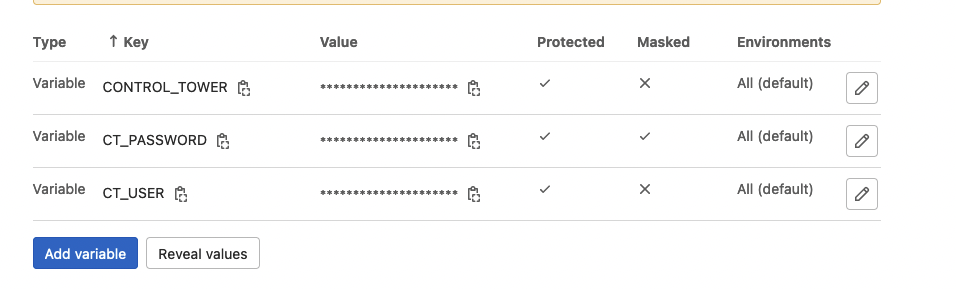
CONTROL_TOWERis the API URL to Control Tower, e.g.api.production.acme.avassa.net.CT_USER, e.g.ci@avassa.io.CT_PASSWORDuser password.
In .gitlab-ci.yml add a deployment job:
deploy:
  stage: deploy
  image: python:3-alpine
  only:
    changes:
      - demo-specs/*
  script:
    # Install curl and download supctl
    - apk add curl
    - curl -OL https://$CONTROL_TOWER/supctl
    - chmod +x supctl

    # Login to the control tower, use Gitlab CI/CD variables
    - echo "$CT_PASSWORD" | ./supctl --host=$CONTROL_TOWER do login $CT_USER > /dev/null

    # Push changes
    - ./supctl replace applications theater-room-manager < demo-specs/theater-room-manager.app.yml
    - ./supctl replace application-deployments theater-room-manager-deployment < demo-specs/theater-room-manager.dep.yml
The job is based on python:3-alpine and it is only triggered if files in the demo-specs directory is changed.
supctl is download using curl, the credentials are used to login and finally the application och deployment specifications are pushed.
GitHub
Go to the project settings and create three variables.
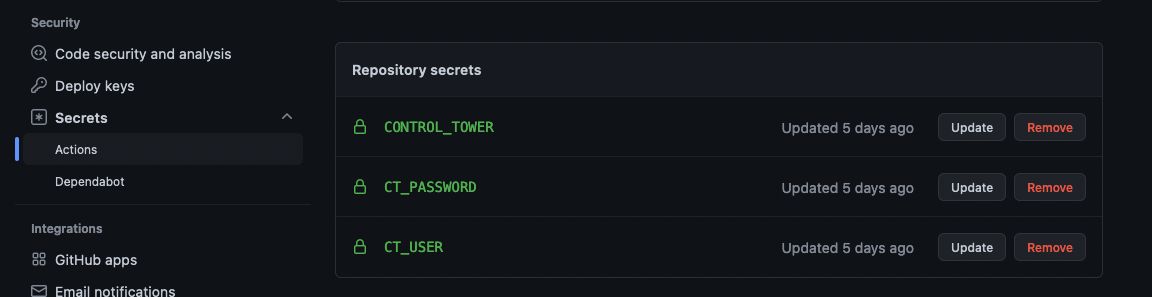
CONTROL_TOWERis the API URL to Control Tower, e.g.api.production.acme.avassa.net.CT_USERisci@avassa.io.CT_PASSWORDuser password.
Finally add a GitHub action:
name: Deploy

on:
  # Triggers the workflow on push or pull request events but only for the main branch
  push:
    branches: [ main ]
  pull_request:
    branches: [ main ]

  # Allows you to run this workflow manually from the Actions tab
  workflow_dispatch:

jobs:
  deploy:
    runs-on: ubuntu-latest

    steps:
      # Checks-out your repository under $GITHUB_WORKSPACE, so your job can access it
      - uses: actions/checkout@v3
      - uses: actions/setup-python@v3
        with:
          python-version: '3.x'

      - name: Get supctl
        run: curl -sOf https://${{secrets.CONTROL_TOWER}}/supctl && chmod +x supctl

      - name: Login
        run: echo "${{secrets.CT_PASSWORD}}" | ./supctl --host=${{secrets.CONTROL_TOWER}} do login ${{secrets.CT_USER}} > /dev/null

      - name: Update application spec
        run: ./supctl replace applications theater-room-manager < theater-room-manager.app.yml

      - name: Update deployment spec
        run: ./supctl replace application-deployments theater-room-manager-deployment < theater-room-manager.dep.yml
This job downloads supctl, does the login using credentials stored in secret variables and finally pushes the application and deployment specifications.
Azure DevOps
In your repository, create (or edit an existing) azure-pipelines.yml.
trigger:
- main

pool:
  vmImage: ubuntu-latest

steps:
- script: curl -sOf https://$(CONTROL_TOWER)/supctl && chmod +x supctl
  displayName: 'Get supctl'

- script: echo "$(CT_PASSWORD)" | ./supctl --host=$(CONTROL_TOWER) do login $(CT_USER) > /dev/null
  displayName: 'Login'

- script: ./supctl replace strongbox vaults operations < operations.yml
  displayName: 'Update vault'

- script: |
    ./supctl replace strongbox vaults operations secrets credentials < credentials.yml
  displayName: 'Update credentials'

- script: ./supctl replace applications theater-room-manager < theater-room-manager.app.yml
  displayName: 'Update application spec'

- script: ./supctl replace application-deployments theater-room-manager-deployment < theater-room-manager.dep.yml
  displayName: 'Update deployment spec'
Note the CONTROL_TOWER, CT_USER and CT_PASSWORD variables. Those are
defined in the pipeline variables (See variables when editing your pipeline).