DNS Setup
A very common scenario is that you want to reach a service running on your Avassa edge site by its name. By default, the ingress addresses of ready applications are added to DNS. However, because most sites are on a private network, name resolution rarely works without some additional network configuration.
This tutorial describes how to configure DNS so that devices on your network can resolve the names of services running on Avassa edge sites. It covers several common network configurations, from a large corporate network with many sites down to a small isolated site.
Before reading this, you should be familiar with the Avassa DNS concepts in DNS, in particular how the Edge Enforcer acts as an authoritative name server for the site domain, and how ingress IP addresses are registered in DNS.
This tutorial assumes you are comfortable with DNS concepts such as nameservers, the difference between recursive resolvers and authoritative nameservers, forward zones, and delegation.
DNS names and certificates
One of the reasons to reach services by name rather than by IP address is TLS certificate verification. Avassa's Control Tower can act as a certificate authority (CA) for services running on your edge sites. Devices that install the Control Tower CA certificate can then verify the authenticity of any service on any edge site over HTTPS (including the Server Name Indication, which typically is the DNS name).
For a practical example of setting this up, see Request certificates in application specifications.
Naming conventions used in this document
The examples below use the following values consistently:
| Thing | Example value |
|---|---|
| Avassa environment (global DNS domain) | prod.example.avassa.net |
| Tenant | acme |
| Sites | blue, green, red |
| Sample application | inventory |
| Customer-owned domain | example.com |
| Custom zone per site | blue.edge.example.com etc. |
For the sake of this example we will assume that the inventory application is configured
with ingress-ip-per-instance, with mode: replicated and replicas: 2 (i.e. it will
request an ingress address for each instance, and it will run in two instances on each
site). The sample ingress addresses will be .40 and .41 in each site's subnet.
Sites differ in size to illustrate that a site can have one or many hosts:
| Site | Hosts | Edge Enforcer IP addresses |
|---|---|---|
blue | 3 | 10.10.10.1, 10.10.10.2, 10.10.10.3 |
green | 1 | 10.20.10.1 |
red | 1 | 10.30.10.1 |
Each host in a site runs its own Edge Enforcer, which includes its own DNS nameserver. Forwarding rules and DHCP nameserver lists should include all hosts in a site so that DNS resolution continues if any one host is unavailable.
Each site has a domain of the form <site>.site.<global-domain>. For example:
blue.site.prod.example.avassa.net
Application records are registered under a tenant subdomain within that:
<service>-<n>.<application>.<tenant>.<site>.site.<global-domain>
For example, the inventory application's instances for tenant acme on site blue:
inventory-1.inventory.acme.blue.site.prod.example.avassa.net
inventory-2.inventory.acme.blue.site.prod.example.avassa.net
inventory.inventory.acme.blue.site.prod.example.avassa.net  - round-robin of ready instances
Because a site can serve multiple tenants, delegation and forwarding should target the
site-level domain (blue.site.prod.example.avassa.net), not a tenant subdomain.
Choosing an approach
| Scenario | Use when |
|---|---|
| 1a. Avassa built-in domain | Corporate network; sites have public IPs, or your resolver supports per-domain private-address exceptions |
| 1b. Direct forwarding | Corporate network; sites have private IPs and you want to avoid touching resolver policy |
| 1c. Custom domain | Corporate network; you want short, branded names (e.g. inventory.blue.edge.example.com), reached either by delegation or by conditional forwarding |
| 2a. Existing nameserver | Standalone site with a pre-existing local nameserver |
| 2b. Edge Enforcer as nameserver | Standalone site with no pre-existing nameserver - simplest possible setup |
The scenarios are grouped by network type. Corporate network (1a–1c): many sites on a shared private WAN managed by a central IT team — using the Edge Enforcer as the resolver for corporate devices is not an option. Standalone site (2a–2b): a single site on its own isolated local network with no connection to a corporate WAN.
Scenario 1: Sites on a corporate network
In this scenario, many sites—potentially tens to hundreds—are all connected to the same corporate private network. A central IT team manages one or more nameservers used by all devices across the network.
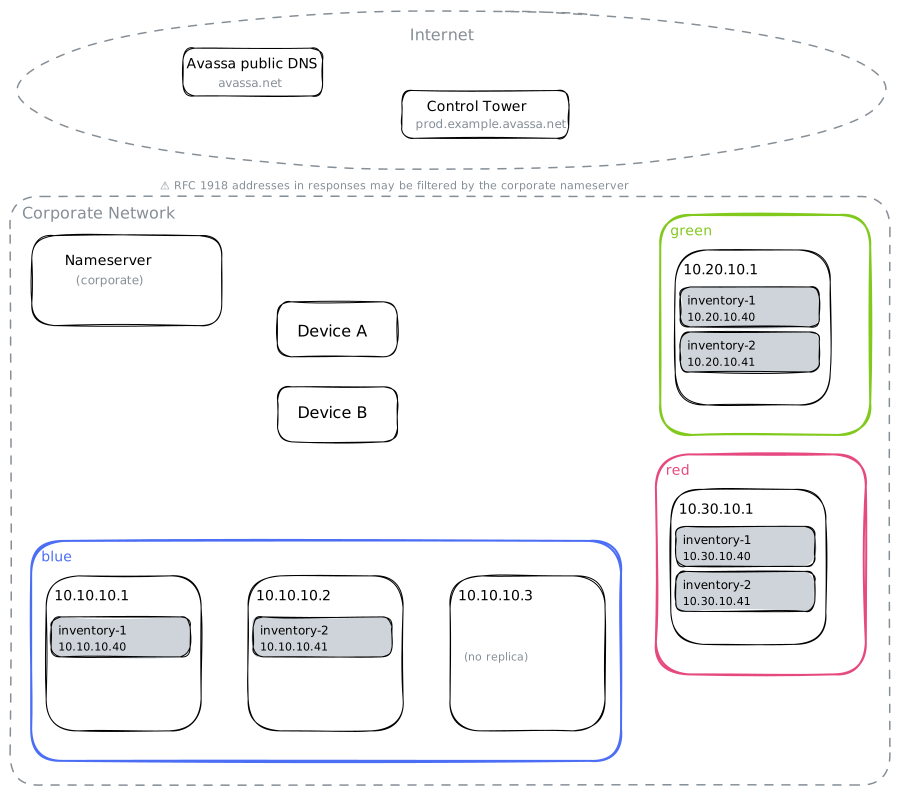
The goal is that any device on the corporate network can resolve the names of services running on any site. There are three approaches.
1a. Avassa built-in domain
Avassa automatically maintains the DNS delegation for the environment domain
(prod.example.avassa.net). A resolver that can reach Avassa's public authoritative
nameservers will follow the delegation chain and eventually reach the Edge Enforcer host
that holds the answer.
The private address problem
Sites on a corporate private network typically have RFC 1918 addresses. When a resolver follows the standard delegation chain and receives a response from a public Avassa nameserver containing a private IP address, some resolvers will discard that address as a protection against DNS rebinding attacks. The lookup fails even though the delegation is technically correct. Whether or not to allow delegation with RFC 1918 addresses is typically a policy decision and most likely requires configuration of the nameservers.
For example: in unbound, private address filtering is controlled by the
private-address directive. It is not enabled by default, but when it is configured, you
can add a targeted per-domain exception using private-domain. This tells unbound to
allow RFC 1918 addresses in responses for a specific domain and all its subdomains, while
leaving the filter in place for everything else:
server:
    private-address: 10.0.0.0/8
    private-address: 172.16.0.0/12
    private-address: 192.168.0.0/16
    private-domain: "site.prod.example.avassa.net"
If your resolver already has private-address configured, you only need to add the
private-domain line.
Other resolvers may have similar or different mechanisms for controlling private address handling; check your resolver's documentation.
When this works well: your sites have public IP addresses, or your resolver either does not filter private addresses or supports a per-domain exception like the one above.
No Avassa-side configuration is required; the delegation is maintained automatically.
If the private-address problem applies and your resolver does not support a per-domain exception, see 1b, which bypasses the delegation chain entirely.
1b. Direct forwarding from corporate DNS
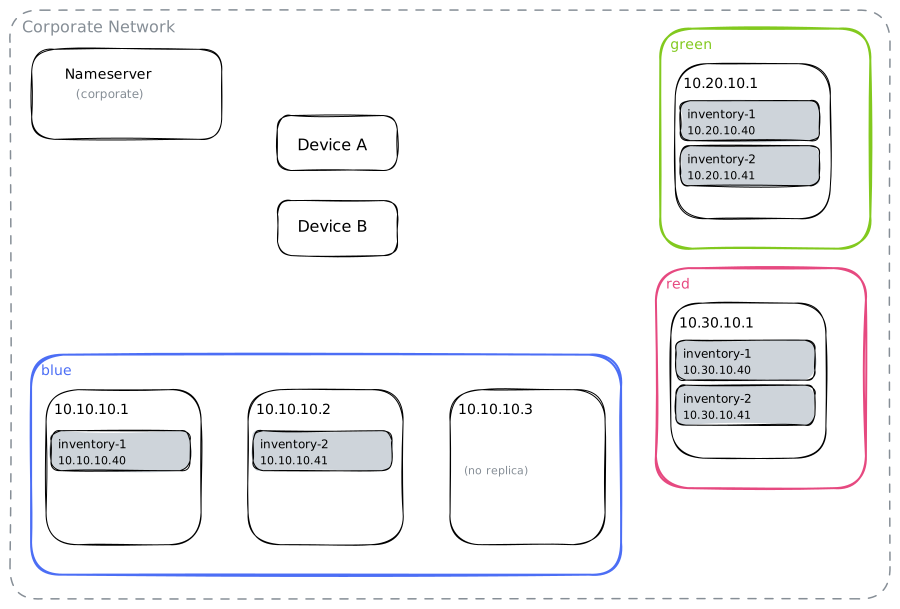
Instead of relying on the public delegation chain, the corporate nameserver is configured with a per-site conditional forwarder that points queries for the site domain directly to the Edge Enforcer hosts. This bypasses the delegation chain entirely and avoids the RFC 1918 problem.
Forward at the site-domain level so that all tenants on the site are covered by a single entry. For each site, add a forward zone to the corporate nameserver:
Unbound:
forward-zone:
    name: "blue.site.prod.example.avassa.net"
    forward-addr: 10.10.10.1
    forward-addr: 10.10.10.2
    forward-addr: 10.10.10.3

forward-zone:
    name: "green.site.prod.example.avassa.net"
    forward-addr: 10.20.10.1

forward-zone:
    name: "red.site.prod.example.avassa.net"
    forward-addr: 10.30.10.1
BIND:
zone "blue.site.prod.example.avassa.net" {
    type forward;
    forward only;
    forwarders { 10.10.10.1; 10.10.10.2; 10.10.10.3; };
};

zone "green.site.prod.example.avassa.net" {
    type forward;
    forward only;
    forwarders { 10.20.10.1; };
};

zone "red.site.prod.example.avassa.net" {
    type forward;
    forward only;
    forwarders { 10.30.10.1; };
};
Windows DNS Server (PowerShell):
Add-DnsServerConditionalForwarderZone -Name "blue.site.prod.example.avassa.net"  -MasterServers 10.10.10.1, 10.10.10.2, 10.10.10.3
Add-DnsServerConditionalForwarderZone -Name "green.site.prod.example.avassa.net" -MasterServers 10.20.10.1
Add-DnsServerConditionalForwarderZone -Name "red.site.prod.example.avassa.net"   -MasterServers 10.30.10.1
No Avassa configuration is required. Each time a new site is added, one more forward zone entry is added to the corporate nameserver.
Trade-off: application configurations reference the full Avassa domain names, which are
verbose (e.g. inventory.acme.blue.site.prod.example.avassa.net). If you want shorter,
company-branded names, see 1c.
1c. Custom domain
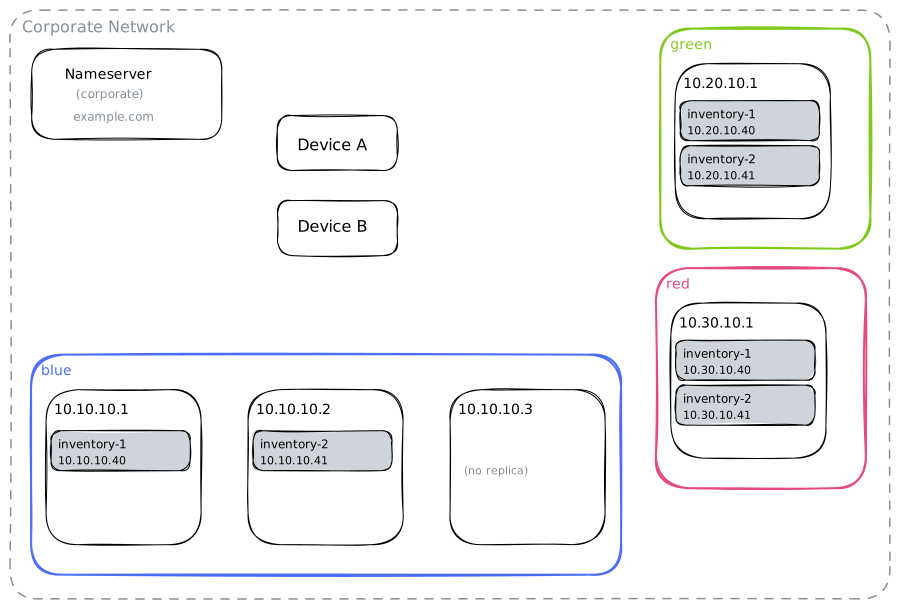
With Avassa's custom domain feature, you can use your own domain (for example example.com)
for service names on each site. This gives you clean, branded names and gives IT more
targeted control over any private-address configuration.
Avassa configuration
Edit the dns object for the acme tenant in the Control Tower to add a custom zone.
Here we name the zone edge and give each site a subdomain under edge.example.com:
zones:
  - name: edge
    domain: ${SYS_SITE}.edge.example.com
With this in place, the Edge Enforcer on each site will consider itself authoritative for
its subdomain (blue.edge.example.com, green.edge.example.com, etc.) and install SOA
and NS records automatically.
To register application service instances in the custom domain as well as the default
Avassa domain, reference it in the application's dns-records configuration:
network:
  ingress-ip-per-instance:
    protocols:
      - name: tcp
        port-ranges: 80,443
    dns-records:
      domains:
        - domain: default
        - domain: ${SYS_DNS_ZONES[edge]}
There are two ways to make the corporate nameservers find the site subdomains: delegate
them from your example.com zone (described next), or configure per-site conditional
forwarders, as in 1b (see Custom domain with conditional forwarding).
DNS delegation
For each site, add NS and glue A records in your example.com zone. The glue record
provides the IP address of the Edge Enforcer host that will answer queries for the site
subdomain:
$ORIGIN example.com.
$TTL 3600

ns1-blue.edge    IN A    10.10.10.1
ns2-blue.edge    IN A    10.10.10.2
ns3-blue.edge    IN A    10.10.10.3
blue.edge        IN NS   ns1-blue.edge.example.com.
blue.edge        IN NS   ns2-blue.edge.example.com.
blue.edge        IN NS   ns3-blue.edge.example.com.

ns1-green.edge   IN A    10.20.10.1
green.edge       IN NS   ns1-green.edge.example.com.

ns1-red.edge     IN A    10.30.10.1
red.edge         IN NS   ns1-red.edge.example.com.
The Edge Enforcer picks up the NS records that the example.com authoritative server has
published, and uses them to set its own SOA and NS records. You can verify this with:
% supctl show --site blue dns
zones:
  ...
  - name: edge
    domain: blue.edge.example.com
    records:
      - rr: @ 300 IN NS ns1-blue.edge.example.com.
      - rr: @ 900 IN SOA ns1-blue.edge.example.com. hostmaster.edge.example.com. ...
      - rr: inventory-1 15 IN A 10.10.10.40
      - rr: inventory-2 15 IN A 10.10.10.41
      - rr: inventory 15 IN A 10.10.10.40 10.10.10.41
Once delegation is in place, any device on the corporate network can resolve the
inventory service using the custom domain:
inventory-1.blue.edge.example.com— A record for the ingress address of the firstinventoryinstanceinventory-2.blue.edge.example.com— A record for the ingress address of the secondinventoryinstanceinventory.blue.edge.example.com— A record containing the addresses of all ready instances, returned in round-robin order
Each time a new site is added, you add one NS record and one glue A record in your
example.com zone. The corporate nameserver requires no per-site configuration—it
follows the delegation from example.com normally.
If your sites have private IP addresses, the glue A records will contain RFC 1918
addresses. Whether your resolver accepts these depends on its configuration. Because the
delegation is within your own domain rather than avassa.net, the exception can be scoped
more narrowly—for example private-domain: "edge.example.com" in unbound.
Custom domain with conditional forwarding
Instead of delegating the site subdomains from example.com, you can combine the custom
domain with the forwarding approach from 1b:
the corporate nameservers get one conditional forwarder per site that sends queries for
the site's custom subdomain directly to its Edge Enforcer hosts.
When to use this variant:
- Your DNS team prefers conditional forwarders to delegations, or the
example.comzone is managed somewhere you don't want to add internal NS and glue records (for example a public DNS provider). - Your resolvers filter RFC 1918 addresses and you don't want to add an exception. Like 1b, forwarding bypasses the delegation chain, so the private-address problem does not arise.
The Avassa configuration is identical to the one above (the edge zone in the tenant's
dns object, and ${SYS_DNS_ZONES[edge]} in the application's dns-records). No records
are added to the example.com zone. Instead, for each site, add a forwarder for the site
subdomain:
Unbound:
forward-zone:
    name: "blue.edge.example.com"
    forward-addr: 10.10.10.1
    forward-addr: 10.10.10.2
    forward-addr: 10.10.10.3

forward-zone:
    name: "green.edge.example.com"
    forward-addr: 10.20.10.1

forward-zone:
    name: "red.edge.example.com"
    forward-addr: 10.30.10.1
BIND:
zone "blue.edge.example.com" {
    type forward;
    forward only;
    forwarders { 10.10.10.1; 10.10.10.2; 10.10.10.3; };
};

zone "green.edge.example.com" {
    type forward;
    forward only;
    forwarders { 10.20.10.1; };
};

zone "red.edge.example.com" {
    type forward;
    forward only;
    forwarders { 10.30.10.1; };
};
Windows DNS Server / Active Directory (PowerShell):
Add-DnsServerConditionalForwarderZone -Name "blue.edge.example.com"  -MasterServers 10.10.10.1, 10.10.10.2, 10.10.10.3 -ReplicationScope Forest
Add-DnsServerConditionalForwarderZone -Name "green.edge.example.com" -MasterServers 10.20.10.1 -ReplicationScope Forest
Add-DnsServerConditionalForwarderZone -Name "red.edge.example.com"   -MasterServers 10.30.10.1 -ReplicationScope Forest
The -ReplicationScope parameter stores the forwarder in Active Directory so that it is
replicated to all domain controllers running DNS (use Domain instead of Forest to limit
it to one domain). Without it, the forwarder exists only on the server where it was
created, and clients that use a different domain controller will fail to resolve the names.
The forwarder is only used if the corporate nameserver is not itself authoritative for
a zone containing the custom domain. If it hosts example.com or edge.example.com
(common with Active Directory when the AD domain is example.com, or when IT maintains an
internal copy of the public zone), it answers queries for blue.edge.example.com from
that zone, returning NXDOMAIN, and never consults the forwarder. Windows DNS Server
behaves this way, and BIND only uses such a forwarder if the parent zone also contains a
delegation for the subdomain. In that situation, use the delegation described above:
add the NS and glue records to the zone the nameserver already hosts.
SOA and NS records
Without a delegation, there are no NS records in example.com for the Edge Enforcer to
pick up. In that case it installs default SOA and NS records for the site subdomain.
Name resolution does not depend on these records, because a forwarding resolver accepts the answers from the Edge Enforcer regardless. Tools that inspect the zone may still report the delegation as missing or inconsistent, and the Windows DNS console may show the forwarder as not validated, which does not affect resolution.
Verifying the setup
Query an Edge Enforcer host directly to check that it answers authoritatively (look for
the aa flag), then query through the corporate nameserver:
% dig @10.10.10.1 inventory.blue.edge.example.com +norecurse
% dig @<corporate-nameserver> inventory.blue.edge.example.com
Each time a new site is added, one more forwarder is added to the corporate nameservers. Note that the names resolve only through those nameservers; resolvers that don't have the forwarders, including anything on the public internet, will not find them.
Scenario 2: Standalone site
A standalone site is a single Avassa site on its own local network—a branch office, retail location, or industrial facility not connected to a broader corporate WAN. Local devices still need to resolve service names, but there is no shared nameserver infrastructure: either there is no central IT team, or the IT team manages each site location independently.
There are two approaches depending on whether a local nameserver is already present.
2a. Delegating from an existing nameserver
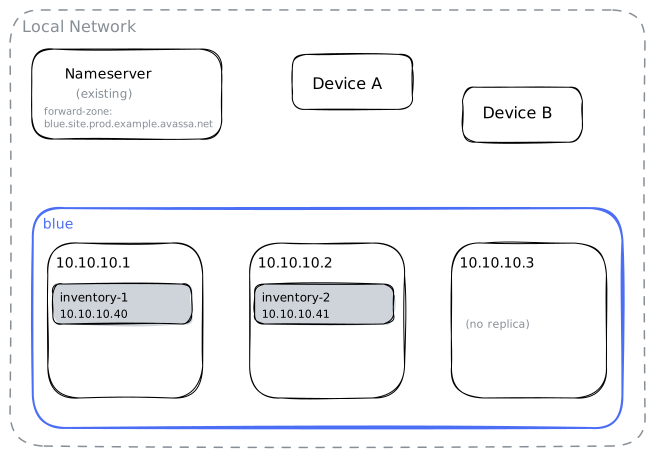
When to use this approach:
- There is already a nameserver on the local network.
- You want local devices to resolve Avassa service names without any device reconfiguration.
Add a forward zone to your existing resolver for the site's domain, pointing to the Edge Enforcer hosts. Forward at the site-domain level to cover all tenants:
Unbound:
forward-zone:
    name: "blue.site.prod.example.avassa.net"
    forward-addr: 10.10.10.1
    forward-addr: 10.10.10.2
    forward-addr: 10.10.10.3
BIND:
zone "blue.site.prod.example.avassa.net" {
    type forward;
    forward only;
    forwarders { 10.10.10.1; 10.10.10.2; 10.10.10.3; };
};
Windows DNS Server (PowerShell):
Add-DnsServerConditionalForwarderZone `
    -Name "blue.site.prod.example.avassa.net" `
    -MasterServers 10.10.10.1, 10.10.10.2, 10.10.10.3
Your resolver will now forward any query for a name under that domain directly to the Edge Enforcer hosts, which will answer authoritatively. Devices do not need any reconfiguration.
2b. Edge Enforcer as local nameserver
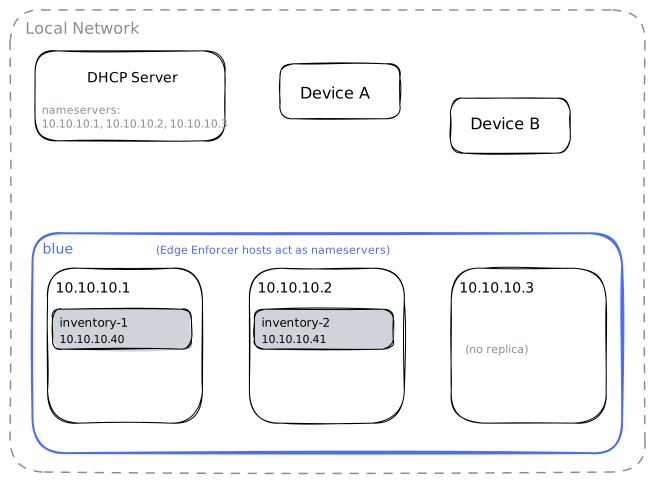
When to use this approach:
- There is no pre-existing nameserver on the local network.
- The local devices need to reach a service running on the Edge Enforcer (for example
the
inventoryapplication). - You have control over the local DHCP server.
Configure your DHCP server to hand out the Edge Enforcer host addresses as the nameserver
for the network. For example, for site blue with three Edge Enforcer hosts:
Kea DHCP (kea-dhcp4.conf, relevant excerpt):
{
  "Dhcp4": {
    "option-data": [
      {
        "name": "domain-name-servers",
        "data": "10.10.10.1, 10.10.10.2, 10.10.10.3"
      }
    ]
  }
}
This sets the nameservers globally for all subnets. The same option-data block can be
placed inside a specific subnet4 entry to apply it only to that subnet.
With this in place, any device that receives a DHCP lease will use the Edge Enforcer as its resolver. The Edge Enforcer will answer queries for the site domain authoritatively and forward all other queries to its own upstream nameserver (or it can act as a standalone recursive resolver if no upstream nameserver is available).
The Edge Enforcer DNS server only allows devices on locally attached networks to perform recursive lookups. Clients from other addresses can only query the site domain(s) for which it is authoritative.